How to use Binance
11th May 2021 |
Outliers: The Story of Success, is a book by Malcolm Gladwell that looks at what makes successful people, successful.
It is a very interesting read and is often referenced thanks to the “10,000-hour rule”.
This “rule” is that experts typically require at least 10,000 hours of correct practice to become experts in a skill.
For most people, if you had seven straight hours a day to specifically focus on that skill and nothing else, it would take about four years to become an “expert”.
In reality it takes even longer – even though it’s absolutely achievable. However, the core point is that to achieve expertise requires a long-term commitment to something.
What about when it comes to the crypto markets? Frankly, you don’t have four years (or longer) to get up to speed. If you’re still treading water on all this in four years’ time, there’s a very good chance you’ll have seen an eternity – and many opportunities – pass you by.
That’s why it’s key to make some giant leaps forward to accelerate your learning. It’s why you come here, to the information I publish to make those leaps. I’ve done my 10,000 hours in crypto – in fact, far more than that. I have a decade of experience and practice and learning. (NB The learning never stops.)
So, where I can help make those leaps, then you’d better pay attention.
One of the biggest leaps you’ll make when you’re getting into crypto is using and navigating exchanges.
Now, I’m not talking about exchanges like Coinbase or Gemini where you can just buy a crypto directly with your pounds, euros or dollars.
I’m talking about an exchange where you can trade or swap one crypto for another.
I often find people who have head to these exchanges, such as Binance have all kinds of information thrown at them which raises more questions than answers.
The result is they are scared off or come to view the whole thing as being too complicated.
I don’t want this to happen to you.
Using an exchange like Binance is actually very easy. You just need to know the correct information.
Also, as you’re about to see, when you can get the knack of one exchange, the others are quite straightforward. Almost all the other exchanges are virtually the same – with some minor tweaks for user experience.
What does the Binance trading window look like?
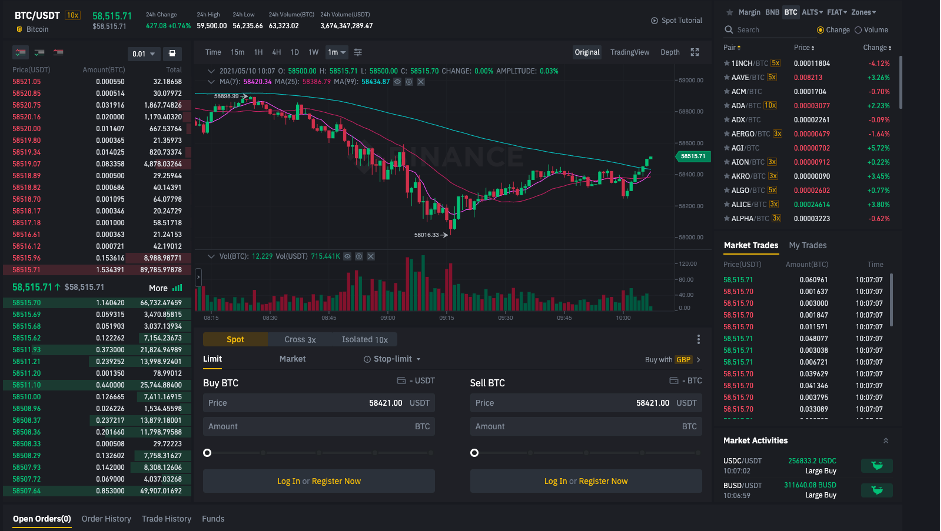
What you see here is a Binance trading pair interface:
 Source: editor’s screenshot of Binance
If you’ve never seen this sort of thing, then it can be a little terrifying.
But I’m going to break it down for you below section by section.
This is a BTC/USDT trading pair. That means a trading pair where you can buy (or sell) bitcoin for Tether.
The chart is obviously the price fluctuations of that particular trading pair. You can adjust the chart to show you one-minute intervals all the way up to one-week intervals. But chart adjustment isn’t all that necessary today.
It’s about using an interface like this that matters.
There are two sections that are really important. These are the order book and the actual trade order.
The next image is the order book:
 Source: editor’s screenshot of Binance
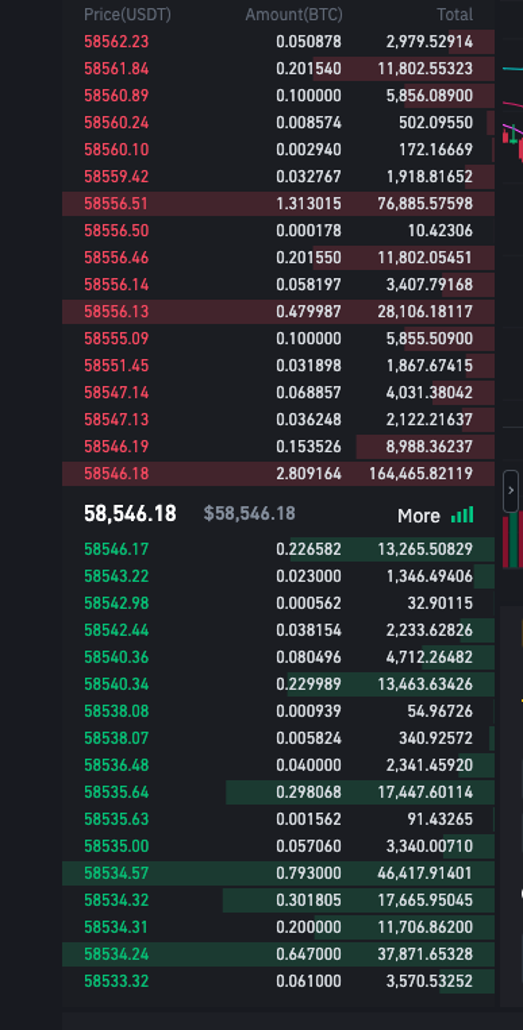
The large white number in the middle is the last traded price. In this instance, it was $58,546 for one whole bitcoin.
The numbers you see in green are all the range of prices that people have put limit orders in to buy bitcoin.
For example, right at the bottom you’ll see a green number, 58533.32. That means someone has placed a buy order for bitcoin with a price of $58,533.32. You’ll also see next to it on the right 0.061000.
That means that particular buy order is for 0.061 bitcoin. And the number next to that, 3,570.53252 is the value of the order – so $3,570.53252.
This is showing that you don’t have to buy a whole bitcoin: you can buy fractions of it.
The red numbers at the top are all the prices that people want to sell bitcoin for.
Hence these are the displayed orders for people who (in this example) what to buy and sell bitcoin for USDT. Now, this is only what’s displayed. You can actually place orders much higher (to sell) or much lower (to buy), depending on what you want to do.
Which leads us to the order window:
 Source: editor’s screenshot of Binance
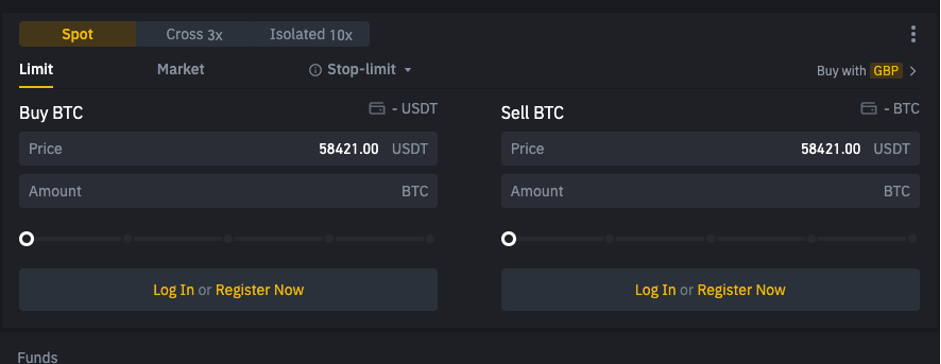
This is where you place your orders for the crypto you want to exchange.
You want to deal with the “Spot” market here. The others, “Cross 3x” and “Isolated 10x” are leverage trading which is something I think you should stay away from.
The spot market is the live market that I explained above in the discussion of the order book.
You also can choose to make limit orders (where you decide on the price you want) and market orders (which will place the trade right away, buy or sell, at the current market prices based on the size of your trade).
Market orders are easier. However, with less liquid crypto you can get drawn into overpaying for a position, and then find it very hard to unwind a position at the desired price.
Limit orders allow you to specify exactly what price you want.
For example if you want to buy bitcoin at $58,200 (below the market spot price because you think the BTC price is going to head lower) you would input that price under “Buy BTC” in the “Price” box and then how much BTC you want in the amount box.
So if you wanted to buy 0.005 BTC at $58,200, those are the numbers you’d use. It would then show the total value of the trade – which, in that case, would be $291. You then place the trade, and your order goes into the order book.
Then you wait and hope your order is filled. If it is, then you’re all done, and the BTC will appear in your wallet.
Note: in this instance, to buy BTC with USDT, you need to already have the USDT in your Binance wallet in order to pay for this trade.
If you wanted to sell your BTC, then you take the same process, but using the “Sell BTC” side of the order window instead.
That’s it. It’s not that hard once you get what the windows are for and how to use them. The same windows are applicable for all crypto pairs that are listed on the exchange.
Now, speaking of all crypto on the exchange…
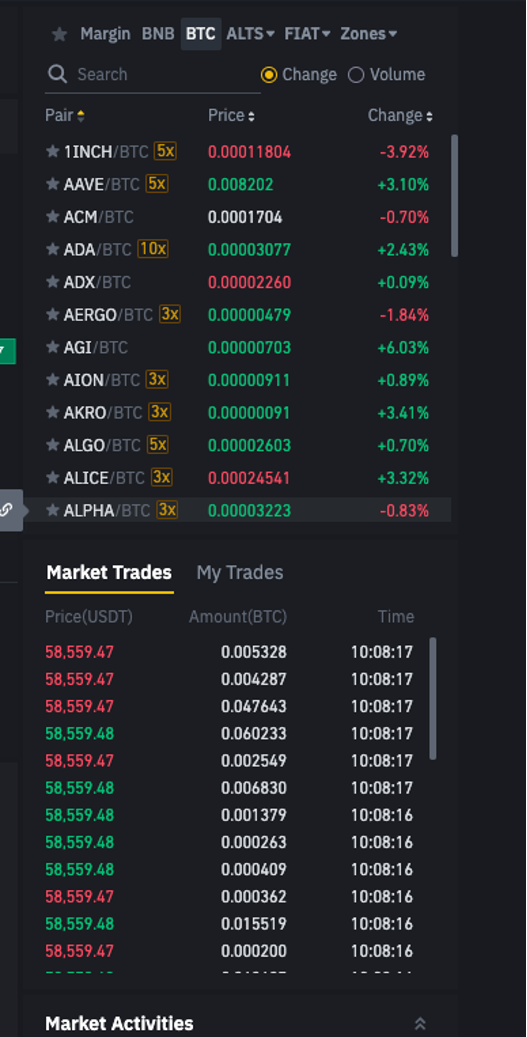 Source: editor’s screenshot of Binance
This final section over on the far right of the whole trading window is more for information about the other trades that you may be looking to make at this time.
At the top you’ll find a search function, this allows you so search for trading pairs. By clicking in the search box and typing in the ticker for the crypto you want to trade, you can find different trading pairs for it.
These might be trading pairs in BTC, BNB, altcoins (such as ETH) or fiat currency stablecoins (such as USDT or BUSD).
You’ll also see a list of different crypto (in this example, trading pairs with BTC) that you can scroll through and choose.
And finally, the list of “Market trades” simply includes all the orders that are successfully made in that trading pair that you’re looking at. Once again, this is merely historical information: however, it shows which were sell orders executed and which were buy orders executed.
And that’s it.
That’s a fly-by introduction to: what Binance trading pairs look like; what each of the sections therein means; and how to use them.
Of course, seeing this is one thing, using it is another.
Hence, you should make sure you that have an account with exchanges like Binance and get used to using it. You shouldn’t expect to become an expert at it right away. But, with a bit of patience and practice, you’ll fast get the hang of it.
Crypto to Know
Below is our “Crypto to Know” list where you’ll find several crypto that we think you should be taking the time to learn and understand.
They each form an important part of the burgeoning crypto ecosystem.
Several of these crypto are doing very different things to others.
What’s key is to learn that every crypto has its own use cases, its own guiding principles, and its own particular potential.
Each crypto is to be judged and assessed on its own merits.
Our aim here is to help you understand these crypto and the wider crypto ecosystem.
These aren’t specific recommendations but a guide to help you learn and build your confidence in operating in this space.
We will add more names to this list over time. However, if you’re new to the world of crypto, these are the names where we think you should start your education and learning.
We’ve also added links to each name.
The links are to what we believe, in each case, is the best resource for learning about that crypto.
“Crypto to Know” watchlist
- Bitcoin – bitcoin.it/wiki/Main_Page
- Ethereum – ethereum.org/en/what-is-ethereum
- IOTA – docs.iota.org
- Tezos – tezos.com/get-started
- Uniswap & 1inch – uniswap.org/faq & help.1inch.exchange/en
- Filecoin – docs.filecoin.io
- Cosmos – https://v1.cosmos.network/intro
Sam Volkering
Editor, Sam Volkering’s Crypto Network